Tuesday, 28 October 2014

De Saint 0511 - Saint Magazine 2

En weer een Saint Magazine. Nu nummer 2. Nog vier en dan heb ik ze allemaal digitaal.
Geen OCR maar gewone imagescans - dus met Calibre of een Comicbook-reader lezen. Klik hier...

saint0511_0000saint0511_0097

Monday, 13 October 2014

Mijn FileMaker Pro boekhoudsoftware geactualiseerd

Ik heb mijn FileMaker Pro 5 boekhoudprogramma's op verzoek geconverteerd naar recentere versies. U kunt de toepassingen nu downloaden voor alle versies vanaf versie 5. Voor elke compatibele versie heb ik een download-knop gemaakt, zoals in onderstaande afbeelding wordt getoond:

Screen Shot 2014-10-13 at 14.00.03

Saturday, 11 October 2014

Monday, 6 October 2014

Spider reproducing themselves

Deze speciale gebeurtenis vond plaats bij ons in de tuin. Bekijk de hele film op YouTube.


This special event happened in our garden. See the full movie on YouTube.
 

Friday, 3 October 2014

Payleven mobiele pin-reader

Sinds kort is er een prachtig mobiel pin-apparaat op de markt dat via bluetooth met je iPhone werkt: Payleven.
Op je iPhone draait de transactie-software terwijl het pin-apparaat uitsluitend de software heeft om de kaart te lezen, PIN te verifiëren en de toetsenbord-input naar de iPhone door te sturen.

payleven

Werkt prima!

Wel zorgen dat:
  • het apparaat is opgeladen,
  • je iPhone is opgeladen,
  • je een opgeladen accu meeneemt voor je iPhone,
  • er een internet-verbinding is (WiFi/WLAN of 3G/4G; GPRS gaat nog wel, is alleen heel erg traag).


Tuesday, 23 September 2014

Subtle Faces

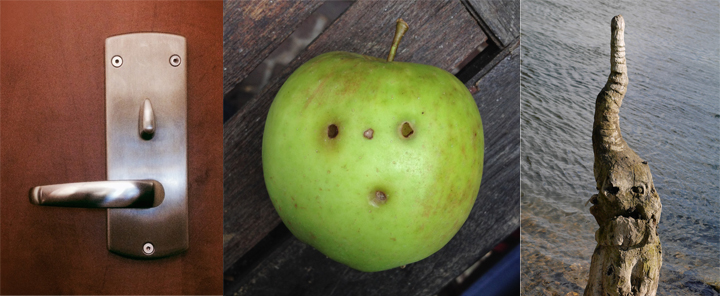
Ik heb een nieuwe foto-pagina gemaakt: Subtle Faces
Hier worden foto's geplaatst van niet-menselijke en niet-dierlijke objecten waarin ik gezichten herken.

I have created a new photo page: Subtle Faces
Here shall be posted pictures from non-human and non-animal objects in which I recognize faces.

faces

Monday, 15 September 2014

Put your Calibre eBooks on iPhone, wherever you are

When you're traveling and want to read that specific eBook which you forgot to put on your iPhone or iPad before you started the trip, then you need the following solution: CrashPlan or Dropbox!


I store all my eBooks in Calibre and Calibre stores them in /Users/<you>/Library/Application Support/Calibre/ and that folder is backed up too with CrashPlan. That is step 1.

With CrashPlan, you can (and should) backup all your data, music and movies automatically on unlimited cloud-storage so your data is backed up outside of your home or work environment. And thus also your eBooks! That is step 2.

And the guys at CrashPlan created an very nice iOS app with which you can access your backup on their cloud-storage from anywhere ... and download files from there onto your iPhone or iPad! And thus also your eBooks! That is step 3.

To illustrate what I mean, I put together an image sequence to illustrates the steps to take to download an eBook from your own backup onto your iPhone or iPad.

Very cool and very handy!

I use this method also when I want to email any file which I have on my desktop at home - I download it from CrashPlan and then email it ... from my iPhone. No need to setup remote login to my iMac, no need to setup screen sharing, etc..

Of course there are other ways, but since this one is completely automatic and also backs up ALL our data, it is my preferred off-site storage solution.


Step 1: Calibre

1-calibre
2-calibre


Step 2: CrashPlan desktop

3-crashplan
4-crashplan


Step 3: CrashPlan on iPhone

5-crashplan
6-crashplan