Showing posts with label Mac. Show all posts

Wednesday, 5 November 2025

SetEXIFData 11.4 #setexifdata #photo #foto #image #fotobewerking #exiftool #exif #exifdata #photography #fotografie #keywords #copyright #author #artist #xojo

setexifdata A new version of SetEXIFData is now available:

v11.4 (05-Nov-2025)

- Fixed: Drag-and-drop any kind of file was possible. This has been corrected.
- Added: Switch on 'largefilesupport' for images over 50MB.
- Updated: The default CSS has been updated.
- Various code and visual improvements.

v11.3 (04-Nov-2025)

- Fixed: Crash when a malformed date (dd.mm.yyyy) was encountered in the metadata.
- Added: You can now use the ESC-key to cancel the Settings-, SaveAsSet- and Geotag-windows.
- New: You can now export all metadata to Text, HTML, JSON or Markdown. Choose your format under 'Export metadata' in the 'General Info'-tab. See the manual for more info.

Tuesday, 14 October 2025

SetEXIFData 11.2

setexifdata A new version of SetEXIFData is now available:

v11.2 (13-Oct-2025)

- Fixed: Choosing the 'About...'-window would crash the SetEXIFData.

Friday, 3 October 2025

SetEXIFData 11.1

setexifdata A new version of SetEXIFData is now available:

v11.1 (03-Oct-2025)

- Fixed: Recognising the correct file type when dropping a folder on the window.
- Fixed: List and window resizing with long file paths.

Friday, 26 September 2025

SetEXIFData 11.0

setexifdata A new version of SetEXIFData is now available:

v11.0
(26 Sep 2025)

- Changed: Select multiple rows, instead of just one, to remove from the list.
- Changed: To open previews of the selected rows, now simply press the space bar, RETURN- or ENTER-key.
- Changed: You can now copy multiple EXIF attributes from the Preview window. Select the rows (SHIFT-Arrows/click, CMD/CTRL-click, CMD/CTRA-A) you want to copy and choose 'Copy' from the 'Edit'-menu.

- Added: File, Windows and Help menu.
- Added: 'Add Files...' menu item.
- Added: 'Add a Folder...' menu item.
- Added: Possibility to drop one or more folders on the window.

Monday, 1 September 2025

SetEXIFData 10.9

setexifdata A new version of SetEXIFData is now available:

v10.9
(01 Sep 2025)

Change:
  • Converted 'EXIF Date field to use' to a combobox.
  • Added the EXIF 'About'-tag for the 'Caption/Description'.
  • Changed the entry field in the 'Save as preset'-dialog into a combobox, so you can choose from existing presets, instead of having to type the name, to overwrite one with new data.
Fixed:
  • Focal lengths and apertures can only contain numbers (millimeters) and one dot.
  • Typed text in comboboxes is now stored directly after enter/return or leaving the entry field.
  • The tag 'LensInfo' is now set correctly, when at least one focal length and one corresponding aperture are filled. Therefore, the default value for Apertures is now '0.0'.
  • Using the File Created or File Modified date are now trimmed of possible new lines.
  • In the file-renaming-pattern,'%y' and '%Y' are now truly recognized as being different.
  • Reading meta-data from Google JSON files works again. Added looking for the new extension '.supplemental-metadata.json'.
  • When reselecting 'EXIF dates or a new ...' after having selected 'Retrieve from Google JSON', the Geotag-fields are now enabled again.
  • GPS for movie files: negative coordinates are now set correctly.
  • macOS: Removed duplicate addresses from the address book menu.
  • Modernised windows, controls and code to use newer Xojo API's.

Monday, 25 August 2025

SetEXIFData 10.8

setexifdata A new version of SetEXIFData is now available:

v10.8
(25 Aug 2025)

New:
  • Converted text input for Document Name, Artist, Copyright, Filename pattern, and Camera- and Lensinfo into Combo-boxes, where the last 10 used entries will be saved.
  • To speed up startup, paths to the helper tools are now stored, and editable, in the 'Settings....' -> 'Various other settings'
  • In the Preview-window, you can now filter on EXIF tags, or their contents, to make it easier to check which ones are present.
  • Now also compiled for Linux and Windows.
Change:
  • All lists are modernized. With some, the dotted lines would disappear.
  • In the Preferences-window, under 'EXIF / IPTC / XMP Tags', the filter on tags has been modernized and improved.
  • Thumbnails of movie files are default taken at 4 seconds. Now, if a clip is shorter, a thumbnail at 0.5 second will be taken.
  • The default rename pattern has now been set to: '%d-%t-%x.%n', instead of underscores.
  • Changed the text 'Finder' into 'file', because of Linux and Windows versions.
  • The OS version in the 'About...' window now shows the complete name and version, instead of just a number.
  • Unknown tags under 'Other tags' are now printed in red.
  • Replaced the Paypal and Paddle buttons with a link to my webshop.
Fixed:
  • Thumbnails of files with single and/or double quotes in the name are now also generated.
  • Finding the path to the various utilities and not finding them, could result in storing the error message and stop further tries.
  • GPS coordinates are now written to movie files. In some cases this was not happening. Tested with .m4v, .mov, and .mp4
  • 'Save as preset' would sometimes use the name of another preset.
  • Get the correct mime type for files with no extension or with extensions like '.jpg_original' or '.mp4_original'.
  • Tabbing through the rows in 'Other tags' is now possible.
  • In 'Other tags', the repeated adding of '?' for unknown tags is fixed.
  • In 'Other tags', the info text above the table is now correctly displayed in full.
  • Image and movie files with '_original' added by exiftool to the file's extension, are now also recognized when dragged onto the grid.

Wednesday, 13 September 2023

SetEXIFData 10.7

setexifdata A new version of SetEXIFData is now available:

v10.7
(13 Sep 2023)

Improved:

  • - Increased the maximum of the number of days you can add or subtract to -9999 and +9999.
  • - Improved error handling when trying to preview a file that is not a media file.

Thursday, 31 August 2023

SetEXIFData 10.6

setexifdata A new version of SetEXIFData is now available:

v10.6
(21 Aug 2023)

Improved:

  • - License deactivation process.

Fixed:

  • - Splash and Geotag window in Dark Mode.

Tuesday, 4 July 2023

SetEXIFData 10.5

setexifdata A new version of SetEXIFData is now available:

v10.5
(25 May 2023)

New:

  • - SetEXIFData now supports Dark Mode.
  • - Changed the toolbar icon to one that is visible in light and dark mode.

Fixed:

  • - Setting Dates/Times via option 1 was broken, and is now fixed.

Thursday, 4 May 2023

SetEXIFData 10.4

setexifdata
A new version of SetEXIFData is now available:

v10.4
(3 May 2023)

New:

  • - SetEXIFData has been localised for English (default), French, German, Italian, Spanish and Dutch.
  • - To make room for the bigger words in these other languages, the main window is a bit larger, and some buttons, labels and fields have been widened and/or moved.

Moved:

  • - The options 'Remove all EXIF, IPTC and XMP tags' and 'Remove all removable tags' have been removed from the 'Dates and Times' drop down menu, and placed on the first panel, at the bottom, in their own drop-down menu.

Download here .

Monday, 3 April 2023

SetEXIFData 10.2

setexifdata
A new version of SetEXIFData is now available:

v10.2
(3 April 2023)

SetEXIFData has moved to my business site.

Go here to read more about the changes.

Friday, 31 March 2023

SetEXIFData 10.1

setexifdata
A new version of SetEXIFData is now available:

v10.1
(29 March 2023)

SetEXIFData has moved to my business site.

Go here to read more about the changes.

Thursday, 18 November 2021

SetEXIFData 9.9

setexifdata
A new version of SetEXIFData , my GUI for exiftool by Phil Harvey , is now available:

v9.9
(18 November 2021)


Fix & Workaround:
  • Due to bug in Xojo with setting the Finder's modified/created dates (they are set 1 hour or 1 hour and 40 minutes ahead), '/usr/bin/setfile' is now used, when it is installed. If not installed, you can install it by installing the Xcode Developer Tools, if you encounter the problem. It seems the bug is fixed in today's release of Xojo, but I will test this first, before relasing v10.0.

  • Open Terminal and copy/paste : xcode-select --install


    New:
  • For better version tracking, I added the necessary info at the top in the 'About...' text field.
  • Wednesday, 17 November 2021

    Tuesday, 2 November 2021

    SetEXIFData 9.8

    setexifdata
    A new version of SetEXIFData , my GUI for exiftool by Phil Harvey , is now available:

    v9.8
    (02 November 2021)

    Fix:
  • Min. and max. Focal lengths did not accept decimal values. This is now fixed.
  • Typing a comma in Min. and max. Focal lengths and Apertures will now be converted to a dot.

  • Tuesday, 26 October 2021

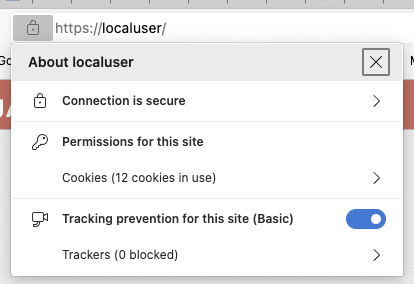
    Use HTTPS with 'localhost' on macOS Big Sur #macos #ssl #https #localhost

    I needed local HTTPS for app-development, because 'Cleartext HTTP traffic to localuser not permitted'.
    My local website development domain is called 'localuser' instead of using 'localhost'.

    So I wrote down what to do and made it into a webpage: Use HTTPS with localhost on macOS 11.6 Big Sur or higher

    When you've followed the steps, you get this:
    https://localuser/

    Wednesday, 1 September 2021

    SetEXIFData 9.7

    setexifdata
    A new version of SetEXIFData , my GUI for exiftool by Phil Harvey , is now available:

    v9.7
    (01 September 2021)

    Fix:
  • Using tags via the 'EXIF / IPTC / XMP Tags' preference setting, in combination with any other setting, resulted in the last tag having the first other setting appended. This now fixed.

  • Friday, 21 May 2021

    SetEXIFData 9.6

    setexifdata
    A new version of SetEXIFData , my GUI for exiftool by Phil Harvey , is now available:

    v9.6
    (23 February 2021)

    Update:
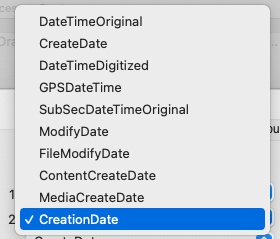
  • In the 'Preferences...' -> 'File Rename settings' -> 'EXIF date fields search order', a new field CreationDate has been added:
  • Tuesday, 23 February 2021

    SetEXIFData 9.5

    setexifdata
    A new version of SetEXIFData , my GUI for exiftool by Phil Harvey , is now available:

    v9.5
    (23 February 2021)

    Note:
  • SetEXIFData is now compiled as a Universal Binary for Intel 64bit and Apple's ARM.
    New:
  • Retrieve the Date/Time from Folder name. This option looks for a valid date in each folder name in the path, bottom to top, according to the given search-pattern.
    Fix:
  • Saving the location as a preference via geotagging was broken in v9.3 / v9.4 an now works again.
    Change:
  • The default rename pattern has now been set to: '%d_%t_%x.%n'.
  • Thursday, 28 January 2021

    SetEXIFData 9.4

    setexifdata
    A new version of SetEXIFData , my GUI for exiftool by Phil Harvey , is now available:

    v9.4
    (28 January 2021)

    Fix:
  • Geotagging was broken in v9.3 an now works again. The newer version of Xojo I used, needed another plugin to get the geodata.
  • Subseconds/sequence number when used with an interval and initially left zero, the Subseconds/sequence number of the first image would not be set to zero.