Showing posts with label Webserver. Show all posts

Wednesday, 17 November 2021

Install CentOS 8 / Stream in Parallels Desktop #centos #parallels #macos


I wrote a short how-to on how to create CentOS 8 VM in Parallels Desktop for Mac, for local development and testing.

Tuesday, 26 October 2021

Use HTTPS with 'localhost' on macOS Big Sur #macos #ssl #https #localhost

I needed local HTTPS for app-development, because 'Cleartext HTTP traffic to localuser not permitted'.
My local website development domain is called 'localuser' instead of using 'localhost'.

So I wrote down what to do and made it into a webpage: Use HTTPS with localhost on macOS 11.6 Big Sur or higher

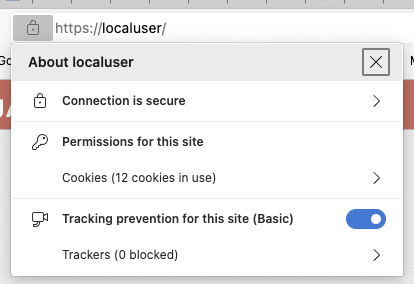
When you've followed the steps, you get this:
https://localuser/

Tuesday, 24 March 2020

Oracle Instant Client + oci8 for PHP and Apache on macOS Mojave #oracle #oci8 #php #macos


I was totally new to using Oracle Instant Client on macOS Mojave, so I had to spend days to figure out and try out on how to get it installed (easy) and how to get the oci8 shared library installed (the hard and most time-consuming part) for use with PHP at both the CLI and in Apache. I have been on many, many websites and read many, many instructions, and I want to thank everyone who put so much effort in clarifying something that actually should be very simple nowadays. After having read and tried so many tips and tricks, I ended up summarizing what worked for me, which I wrote down on Oracle Instant Client + OCI8 on Macos Mojave for PHP .

Sunday, 24 June 2018

Setup your local macOS X web server #apache #macos #macosx #webserver #localhost #webdevelopment

I've put together a page where I describe how you can setup a web development environment with two or more Apple Macs.

If you are a web developer working on Apple Macs, you sure do want to use the macOS X built-in web server, Apache, on all your Macs. And you want to be able to access your Sites folder, local web documents folder and your other Mac via HTTP.

I'll describe how to set it up on macOS High Sierra (10.13.5). If you're on a previous version of macOS X, not to worry, the steps to take are practically identical. Read on ...

Tuesday, 27 February 2018

The Blogspot Stack 1.1.4 for Stacks with RapidWeaver


Version 1.1.4 is out with the following changes:
Version 1.1.4
Released on 27 feb 2018.
  • Known issues with deprecated, removed and changed PHP calls from PHP v5.4 through v7.1 : fixed
  • Some other bugs fixed.
  • Added a checkbox 'Display errors on', which shows possible PHP warnings. Use it on your local machine and on your live site and then please report any warnings and errors you see (Deprecated: , Warning:, Notice:, Fatal error:), to me, with screen-shots. Then switch it of again.
  • Added YEAR-only option to archives. When selected, archive-links are shown as 1 link per year, and when 'Show archive count' is checked, with the number of posts per year.
  • Removed 'Show author' checkbox - you can swicth it on or off in the 'Alternate ordering'-settings.
  • Added the option to leave out blogpost-sections inside 'Alternate ordering'. If you don't want a certain section in your blogposts, check 'Alternate ordering' and choose the 'blank' option for that section.
  • Added the RSS feed link as a stack. Instead of being always on top of the blog, you can now place it anywhere you prefer, or use this code snippet: <?php renderRSSlink(); ?>
  • Included FontAwesome via Stacks API.
  • Cosmetic changes.
  • If you purchased this stack, you can re-download the installer via your Paddle account.
    If not, you can read more about it here .

    Friday, 23 February 2018

    The Blogspot Stack 1.1.3 for Stacks with RapidWeaver


    Version 1.1.3 is out with the following changes:
    Version 1.1.2
    Released on 23 feb 2018.
    Bug fixed when viewing a permalink.
    Permalinks now have the Google SEO name added to their URLs.
    Version 1.1.3
    Released on 23 feb 2018.
    You may now also enter the complete domain, like myblog.blogspot.nl, if you feel more comfortable about it.
    Domain check: if the domain you entered, doesn't exist, an error is displayed at the top of the page. In Preview and real-time mode.
    Some PHP4 code removed.
    Fixed E_STRICT and E_DEPRECATED errors. Not by simply switching error-reporting off, but really fixing the code!
    If you purchased this stack, you can re-download the installer via your Paddle account.
    If not, you can read more about it here .

    Thursday, 22 February 2018

    The Blogspot Stack 1.1.1 for Stacks with RapidWeaver


    Version 1.1.1 is out with the following changes:
    Version 1.1.0
    Released on 21 feb 2018.
    Added 'In blog-entry footer (default)' to the Interblog-settings.
    Version 1.1.1
    Released on 22 feb 2018.
    Bug fixed in XML parser.
    Code improvements.
    If you purchased this stack, you can re-download the installer via your Paddle account.
    If not, you can read more about it here .

    After installing the update, you have to mark the page as changed and re-publish it, so the updated code files get uploaded to your server:


    Monday, 19 February 2018

    The Blogspot Stack for Stacks with RapidWeaver


    As a replacement for the old RapidBlog from Loghound , I created a replacement, named Blogspot.

    Although RapidBlog was a page-plugin for Realmac's RapidWeaver , my replacement is a stack, for use with YourHead's Stacks-plugin .

    Read all about it here

    The advantage now, is that:
    • You don't have to add new posts inside RapidWeaver. Blogger is much better for that purpose.
    • It's mobile-friendly
    • By using Stacks, you can place a Blogger-blog anywhere in the content-area of the page.
    • It's fast
    • No usernames and passwords required to login to Blogger.
    • Blogspot.stack displays any public accessible Blogspot-domain.

    Thursday, 15 February 2018

    Copy DOM content to the clipboard with pure Javascript

    Of all the tips on the internet on how to copy data from a DOM element to the clipboard, I compiled my own function(s).

    The examples below are to copy the 'href'-part of  a link to an RSS feed to the clipboard.

    1. By class name, use the first found element
    function copyToClipboardCN(element, attr) {
     x = document.getElementsByClassName(element);
     if(x !== undefined && x !== null && x[0] !== undefined) {
      var textarea = document.createElement("textarea");
      document.body.appendChild(textarea);
      textarea.value = x[0][attr];
      textarea.select();
      var status = document.execCommand('copy');
      textarea.remove();
     }
    }
    

    2. By id
    function copyToClipboardID(element, attr) {
     x = document.getElementById(element);
     if(x !== undefined && x !== null) {
      var textarea = document.createElement("textarea");
      document.body.appendChild(textarea);
      textarea.value = x[attr];
      textarea.select();
      var status = document.execCommand('copy');
      textarea.remove();
     }
    }
    

    RSS feed link example with a class and an ID, using FontAwesome icons :

    <a class="blog-rss-link" href="https://macvos.blogspot.com/feeds/posts/default" rel="alternate" target="_blank" title="RSS Feed" type="application/rss+xml"><i class="fa fa-rss"> RSS Feed <i class="fa fa-copy" onclick="copyToClipboardCN('blog-rss-link', 'href')" style="cursor: pointer;" title="Copy RSS link to clipboard">

    <a id="blog-rss-link" href="https://macvos.blogspot.com/feeds/posts/default" rel="alternate" target="_blank" title="RSS Feed" type="application/rss+xml"><i class="fa fa-rss"> RSS Feed <i class="fa fa-copy" onclick="copyToClipboardID('blog-rss-link', 'href')" style="cursor: pointer;" title="Copy RSS link to clipboard">

    I have thought about combining the two functions into one, but i find that dangerous. In case you don't, here it is:
    function copyToClipboard(element, attr) {
     var x = document.getElementById(element);
     if(x === undefined || x === null) {
      x = document.getElementsByClassName(element);
      if(x !== undefined && x !== null && x[0] !== undefined) {
       x = x[0];
      }
      else {
       x = undefined;
      }
     }
     if(x !== undefined) {
      var textarea = document.createElement("textarea");
      document.body.appendChild(textarea);
      textarea.value = x[attr];
      textarea.select();
      var status = document.execCommand('copy');
      textarea.remove();
     }
    }
    

    Tuesday, 27 June 2017

    [Repair] MySQL Upgrade on Mac OS X

    Some time ago I did a MySQL upgrade without thinking ... that was not funny. So I retraced what I did to get the new version up and running and wrote it down as a sequence of steps to follow, when I need to upgrade to the next higher version.

    I published these steps on the page [Repair] MySQL Upgrade (Mac OS X) , so they might be of help to you too.

    Tuesday, 19 July 2016

    Add or Subtract Business Days in Javascript, PHP and Lasso

    I was lately looking for a working version of a function to add and/or subtract business days. The scripts and code I found via Google somehow did not produce the correct results all the time - and I do not mean the loops that simply add a day and check for weekends. Read more . . .
     

    Friday, 23 October 2015

    Apache vhost sort order on CentOS

    I’ve written a page on how to control the order of Apache vhosts [on CentOS]. Just for reference.
     

    Monday, 7 January 2013

    Restrict Lasso AJAX-file calls to the intended web page

    Suppose you have a nice setup where a page interacts with the server via AJAX-calls and executes a Lasso file on the server to get some data. You don't want this file to be called directly via the URL-bar in a web browser, or via other self-made web pages by others who try to access it via a copy of your page. Anybody can see which AJAX-files your page is calling, so for some it is always a challenge to execute them outside the normal webpage to see what data will come up. Might be of interest! So you want to prevent that, somehow.

    There is a Lasso-tag called referrer_url, which returns a string containing the URL that requested your AJAX-page. If you look into this string for a domain name or a path that only you have, you can block execution if the requestor is not coming from your server. When a page is called directly in the browser, the referrer_url is always an empty string. Which is logical, since the page was not referred to by another page.

    Suppose I have a page mypage.html with a jQuery auto-complete implementation in it. This auto-complete can of course be used by more than one page and you do not want people to try it out in other ways.

    ...
    ...
    <input type="text" id="inp1" size="25"><span id="desc1"></span>
    ...
    ...
    <script>
    $(document).ready(function() {
       $("#inp1").autocomplete({minLength:2, source: "ajax.lasso?p1=a&p2=b", select: function(e,u) { $("#inp1").val(u.item.value); $("#desc1").html((u.item.label).replace("(" + u.item.value + ")", "")); return false; } });
    });
    </script>


    Simple protection:
    [
    if (referrer_url >> '/mypage.html' || referrer_url >> '/myotherpage.html');
    ...
    ...
    /if;
    ]


    Better protection:
    [
    if (string(referrer_url)->beginswith('http://my.domain.com/') &&
       (referrer_url >> '/mypage.html' || referrer_url >> '/myotherpage.html'));
    ...
    ...
    /if;
    ]


    So this gives you some protection from just try something-users. Add a login-system, which restricts the number of users that might want to hack your pages - you can trace their actions on your site. In that case, add a check if the user is logged in. You must execute your complete login-sequence in your AJAX-pages too, as with 'normal' pages, since the xhttprequest is a normal HTTP request and thus the browser sends the same HTTP-headers and cookies, etc.. to your AJAX-page.

    More protection:
    [
    if (referrer_url >> '/mypage.html' || referrer_url >> '/myotherpage.html');
       var('loggedIn = false');

       include('checkuser.lasso');

       if($loggedIn);
          ...
          ...
       /if;
    /if;
    ]


    Even better protection:
    [
    if (string(referrer_url)->beginswith('http://my.domain.com/') &&
       (referrer_url >> '/mypage.html' || referrer_url >> '/myotherpage.html'));
       var('loggedIn = false');

       include('checkuser.lasso');

       if($loggedIn);
          ...
          ...
       /if;
    /if;
    ]


    But, as with everything web-related, nothing can be trusted.
     

    Tuesday, 14 February 2012

    'Transfer services from server to server' mind map

    Using mind maps to follow your thoughts and track your findings is really a superb experience, every time again. And especially MindMeister, because it is 'in the cloud', i.e. web-based and can be accessed from anywhere and almost anything.

    Every one of my personal projects goes into MindMeister if it involves more than just a few scribbles. In this mind map, I have noted all steps I must take, with all peculiarities that arise in the process, to transfer web sites and services from one server to another, in this case from a virtual CentOS server to a co-located MacMini Server from 2011. Mind you, the MacMini Server is no toy anymore - it is blazing fast!

    I find this mind map quite interesting and since I am not the only one in the world doing stuff like this, I thought I'd share it so you, reader, might find the information in it somehow useful.

    to_MacMINIthumb

    Monday, 2 November 2009

    Virtual host order on Mac OS X Server

    I am in the process of converting my website forwarding setup to actual host names (A-records). I was quite reluctant to do this at first, because I could not oversee the consequences and googling didn't reassure me either. But on the LDC09, I talked to Chris who kindly explained to me how easy and unproblematic this actually is. Being a sceptic, I did not start by converting all entries at once, but I do convert one entry per day - when it succeeds.

    The first one went wrong already because of my logical thinking as a programmer. I pointed the subdomain name to our Mac OS 10.4 server and setup the site there, putting the default (*) at the bottom. Hey, where is a catch-all entry for!? It belongs at the end, just like with a if/else/end - the last 'else' is the catch-all. But from that moment on, every site landed on my newly created domain, so I quickly swapped the two site entries so that the catch-all was the first one again. Now it worked.

    So I made a whole plan : setup a subdomain on one afternoon and check if it works the next morning. This way I set some others up on this 10.4 server and they all work.

    Then comes the day I needed to setup the same construct on a Mac OS 10.5 Server. So I deleted the website forwarding entry, created the A-record, created the site on the OS X server, leaving the catch-all at the top and waited until the next morning. The domain name worked all right, but landed on /library/webserver/documents/ (the www-root) instead of the path I put into the site. I have been struggling for two days with this 10.5 server. I checked and double checked, changed the site's path, etc.. Nothing worked, it kept landing on the webroot. And today I thought, what if I swap the site entries and put the default (*) at the bottom (as I did at first on the 10.4 server) and ... it worked! I tested the other sites which have no domain name yet (website forwarding) and they all work ok.

    So the order for site entries on MacOS 10.4 Server differs from MacOS 10.5 Server. You can see that in the
    sites folder inside the Apache folder (/etc/httpd/ on 10.4 and /etc/apache2/ on 10.5). Sites are loaded by including sites/*.conf and the order is determined by the name of the conf-files (10.5 example):

    -rw-r--r-- 1 root wheel 1659 Nov 1 17:12 sites/0000_any_80_my.site.com.conf
    -rw-r--r-- 1 root wheel 1857 Nov 1 17:12 sites/0001_any_80_default.conf
    -rw-r--r-- 1 root wheel 566 Nov 1 17:12 sites/virtual_host_global.conf


    So it seems on 10.5 the catch-all sites are loaded last.

    Monday, 5 October 2009

    At the Lasso Developer Conference 2009

    LDC09-2009-10-5-22-17

    From october 1 thru 4, the Lasso Developer Conference 2009 was held in Amsterdam. For me, this was the first time because a) it was in Amsterdam and b) Lasso 9 would be introduced and c) at last I would meet quite a few fellow Lasso-ers in real life.
    There were some round-tables and workshops presented by Lasso-ers themselves, where some interesting topics were discussed and great solutions to returning questions were offered.
    LassoSoft picked a real cool location: Spaces at the Herengracht. You can see some photo's of it here.

    It was great. Thanks Lassosoft and everyone for this opportunity!

    DSCF0114-2009-10-5-22-17.JPG

    LDC09 Video's :
    YouTube - LassoSoft's channel

    Here are some links to LDC09 material :
    LassoTech
    At_begin URL-handling and REST
    Version Control Systems
    L-Migrator presentation
    itPage presentation
    Lfor presentation
    Encoding and Character-sets
    File permissions
    jquery Week calendar

    Check out the lively Lasso community at LassoTalk
    And Brian's blog-post