I was lately looking for a working version of a function to add and/or subtract business days. The scripts and code I found via Google somehow did not produce the correct results all the time - and I do not mean the loops that simply add a day and check for weekends. Read more . . .
Showing posts with label Lasso. Show all posts
Showing posts with label Lasso. Show all posts
Tuesday, 19 July 2016
Thursday, 7 November 2013
Store/Show BLOB images with PHP and Lasso 9
I have added a new page to the 'How To'-list where you can find information about how to read an image from disk, store it into a MySQL blob-field and display that image on a web page. Reading and storing is done with PHP, displaying with Lasso 9. [Read more...]


Thursday, 14 February 2013
Remove dynamic tables from Lasso 8 and MySQL
I wrote a small script that cleans up Lasso 8's internal SQLite database from dynamically created tables in MySQL. It also deletes the dynamic tables from MySQL when older then 2 days, so you do not need a separate script for that.
In my case, the script has been written to clean my dynamically created temp tables, which names all begin with 'REP'. But you can copy the script and of course modify it to your needs.
Happy coding!
In my case, the script has been written to clean my dynamically created temp tables, which names all begin with 'REP'. But you can copy the script and of course modify it to your needs.
Happy coding!
Monday, 7 January 2013
Restrict Lasso AJAX-file calls to the intended web page
Suppose you have a nice setup where a page interacts with the server via AJAX-calls and executes a Lasso file on the server to get some data. You don't want this file to be called directly via the URL-bar in a web browser, or via other self-made web pages by others who try to access it via a copy of your page. Anybody can see which AJAX-files your page is calling, so for some it is always a challenge to execute them outside the normal webpage to see what data will come up. Might be of interest! So you want to prevent that, somehow.
There is a Lasso-tag called referrer_url, which returns a string containing the URL that requested your AJAX-page. If you look into this string for a domain name or a path that only you have, you can block execution if the requestor is not coming from your server. When a page is called directly in the browser, the referrer_url is always an empty string. Which is logical, since the page was not referred to by another page.
Suppose I have a page mypage.html with a jQuery auto-complete implementation in it. This auto-complete can of course be used by more than one page and you do not want people to try it out in other ways.
...
...
<input type="text" id="inp1" size="25"><span id="desc1"></span>
...
...
<script>
$(document).ready(function() {
$("#inp1").autocomplete({minLength:2, source: "ajax.lasso?p1=a&p2=b", select: function(e,u) { $("#inp1").val(u.item.value); $("#desc1").html((u.item.label).replace("(" + u.item.value + ")", "")); return false; } });
});
</script>
Simple protection:
[
if (referrer_url >> '/mypage.html' || referrer_url >> '/myotherpage.html');
...
...
/if;
]
Better protection:
[
if (string(referrer_url)->beginswith('http://my.domain.com/') &&
(referrer_url >> '/mypage.html' || referrer_url >> '/myotherpage.html'));
...
...
/if;
]
So this gives you some protection from just try something-users. Add a login-system, which restricts the number of users that might want to hack your pages - you can trace their actions on your site. In that case, add a check if the user is logged in. You must execute your complete login-sequence in your AJAX-pages too, as with 'normal' pages, since the xhttprequest is a normal HTTP request and thus the browser sends the same HTTP-headers and cookies, etc.. to your AJAX-page.
More protection:
[
if (referrer_url >> '/mypage.html' || referrer_url >> '/myotherpage.html');
var('loggedIn = false');
include('checkuser.lasso');
if($loggedIn);
...
...
/if;
/if;
]
Even better protection:
[
if (string(referrer_url)->beginswith('http://my.domain.com/') &&
(referrer_url >> '/mypage.html' || referrer_url >> '/myotherpage.html'));
var('loggedIn = false');
include('checkuser.lasso');
if($loggedIn);
...
...
/if;
/if;
]
But, as with everything web-related, nothing can be trusted.
Monday, 20 February 2012
mv_timeMenu
I just edited the tag mv_timeMenu on tagSwap. Because copy/paste on tagSwap does something with line endings that makes much code end up all being on one line, I post the routine here too. Simply copy & paste.
/*
Creates a list of time values inside a <select></select>. Example:
<select name="xyz" class="abc" id="def">
[mv_timeMenu(-fromHour=800, -toHour=2300, -minutes=25, -selected=$db_value]
</select>
*/
define_tag('mv_timeMenu', -optional='fromhour', -copy, -optional='tohour', -copy, -optional='minutes', -copy, -optional='selected', -copy, -optional='firstblank', -EncodeNone);
local('result' = '', 'p' = 0, 'z' = 0, 'h' = 0, 'm' = 0, 'y' = 0, 'f' = false);
if(! local_defined('firstblank'));
local('firstblank' = 0);
else(integer(#firstblank) <= 0);
#firstblank = 0;
/if;
#firstblank = integer(#firstblank);
if(! local_defined('fromhour'));
local('fromhour' = 0);
else(integer(#fromhour) <= 0);
#fromhour = 0;
/if;
#fromhour = integer(#fromhour);
if(! local_defined('tohour'));
local('tohour' = 2359);
else(integer(#tohour) <= 0 || integer(#tohour) >= 2400);
#tohour = 2359;
/if;
#tohour = integer(#tohour);
if(! local_defined('minutes'));
local('minutes' = 15);
else(integer(#minutes) <= 0);
#minutes = 15;
/if;
#minutes = integer(#minutes);
if(#firstblank);
#result = '<option value="" ';
if(local_defined('selected'));
if(#selected == '');
#result += ' selected="selected"';
/if;
/if;
#result += '></option>';
/if;
// Calculate correct starting point
#z = #fromhour;
#h = integer(#z / 100); // Take hours-part
#m = #z - (#h * 100); // Take minutes-part
#y = integer(#m / #minutes); // Calculate how many times the frequency fits
// Calculate new minutes-starting-point
if(#m == (#y * #minutes));
#m = #y * #minutes;
else;
#m = (#y + 1) * #minutes;
/if;
#y = integer(#m / 60); // Calculate how many hours minutes-starting-point contains
#h += #y; // Add those hours to the hours-part
#m -= (#y * 60); // Subtract the hours from minutes-starting-point
#z = (#h * 100) + #m; // Construct new time
#p = 0;
#f = false;
while(#z <= #tohour);
#result += '<option value="' + mv_fmtnum(#z, '####', 'R') + '" ';
if(local_defined('selected'));
if(!#f && #selected != '' && #selected >= #p && #selected <= #z);
#result += ' selected="selected"';
#f = true;
/if;
/if;
#result += '>' + mv_fmtnum(#z, '##:##', 'R') + '</option>';
#p = #z; // Save previous time
#h = integer(#z / 100); // Take hours-part
#m = #z - (#h * 100); // Take minutes-part
#m += #minutes; // Add interval to the minutes to get total-minutes
#y = integer(#m / 60); // Calculate how many hours total-minutes contains
#h += #y; // Add those hours to the hours-part
#m -= (#y * 60); // Subtract the hours from total-minutes
#z = (#h * 100) + #m; // Construct new time
/while;
return(#result);
/define_tag;
Friday, 3 June 2011
Finding postcodes near a known postcode
I am building a website where I need to find people based on their postcode and have been searching the past month for a good and cheap solution. From solutions costing around €2000 down to solutions costing €500 down to one which costs only €99 for a latitude/longitude database of Dutch postcodes, to be found at GEODATAS.net. On their website is sample code present and I converted the PHP-version to Lasso 8 code. —> Click here for how-to and demo code.
Tuesday, 12 April 2011
Certified Lasso Developer 'Bragware'
As stated in their email in which I received this medal: pure bragware! In that case ... Let's brag! 

Wednesday, 23 March 2011
Coding Lasso with RapidWeaver as a framework
I have created a page of how I recently found a cool way to use #RapidWeaver, #Lasso and #Coda at the same time and use RapidWeaver only for the framework, which it does very good.
Thursday, 25 November 2010
Use Flot graphing library with Lasso Professional
I have created a quick example on how to create a graph with Flot and Lasso Professional. Flot is a really cool graphing library and Lasso is a cool programming language. Together, they create a great graph!
Friday, 5 November 2010
At the Lasso Developer Conference 2010
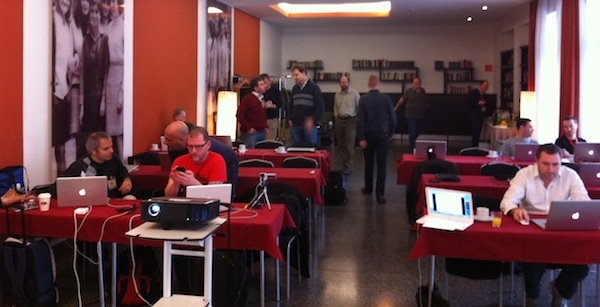
The Euro Lasso Developer Conference 2010 was held in Berlin on 30 and 31 of october 2010 @ GLS Campus Berlin. Organized by ANU Internet Services, this was a great idea and happening. The brand new Lasso 9 was discussed very much; various demos and presentations of code and sites built with Lasso 9. LassoSoft announced they found an investor and were getting back on track! Only good news - of course!
It was nice to meet fellow developers who I normally only have contact with by reading and posting to mailing lists.
Thanks to Chris Wik from ANU for his spontaneous idea and rapid put-together of a well done DevCon!
Presentation Videos:
The Eurolasso Channel @ Bambuser
More links:
Database Versioning by Johan Sölve
L-Debug and L-Benchmarking by Ke Carlton
 Twitter
 Flickr

Tuesday, 19 October 2010
Install Lasso 9 from svn on Mac OS X client
I have put together instructions on how to install Lasso 9 from the svn repository on a Mac. The content is derived from pages at LassoTech, extended with stuff I came across during installation or via email exchange with fellow coders.
Tuesday, 20 July 2010
Saturday, 10 July 2010
Using FTP in Lasso
I created a page about the various ways to use the FTP protocol with Lasso, from and to various systems. Find it here. I have been trying to get it work the last few days and now that it does, I wanted to share what you can do. Of course there are probably installations where it all works out-of-the-box, but this time not with me.
Monday, 5 October 2009
At the Lasso Developer Conference 2009

From october 1 thru 4, the Lasso Developer Conference 2009 was held in Amsterdam. For me, this was the first time because a) it was in Amsterdam and b) Lasso 9 would be introduced and c) at last I would meet quite a few fellow Lasso-ers in real life.
There were some round-tables and workshops presented by Lasso-ers themselves, where some interesting topics were discussed and great solutions to returning questions were offered.
LassoSoft picked a real cool location: Spaces at the Herengracht. You can see some photo's of it here.
It was great. Thanks Lassosoft and everyone for this opportunity!

LDC09 Video's :
YouTube - LassoSoft's channel
Here are some links to LDC09 material :
LassoTech
At_begin URL-handling and REST
Version Control Systems
L-Migrator presentation
itPage presentation
Lfor presentation
Encoding and Character-sets
File permissions
jquery Week calendar
Check out the lively Lasso community at LassoTalk
And Brian's blog-post
Subscribe to:
Posts (Atom)